
SPF, DKIM, DMARC: can your domain be spoofed by email?
Lire en français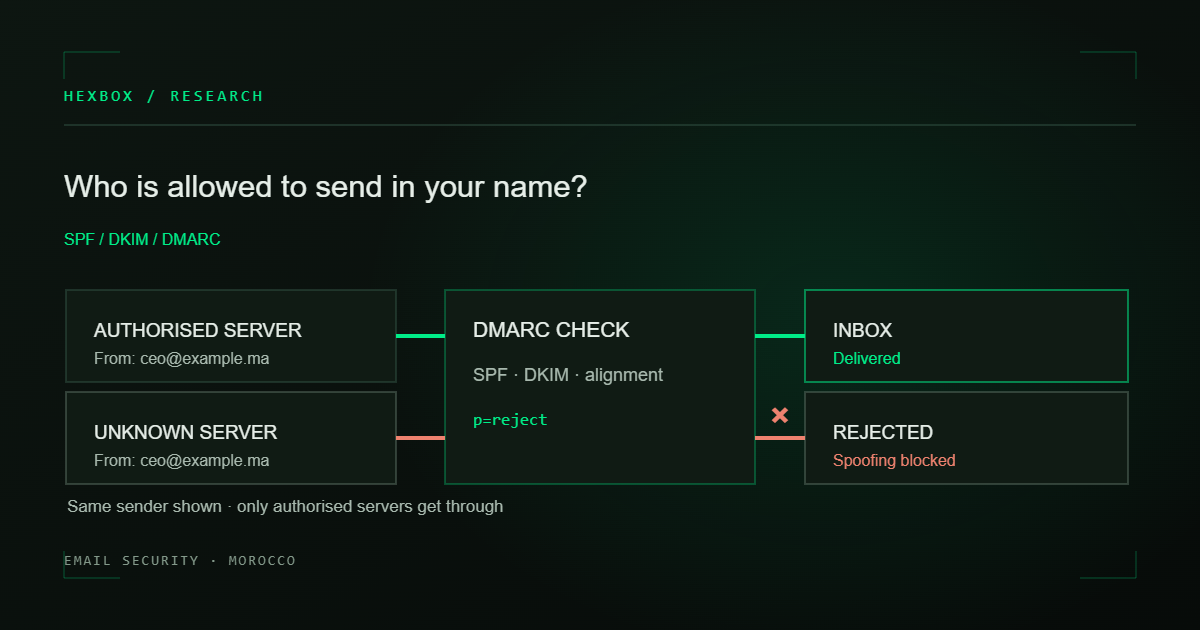
SPF, DKIM and DMARC explained plainly, with the commands to check in two minutes whether your domain can be spoofed by email.
Table of contents
The protocol that carries email was designed without any check on the sender. Without specific configuration, anyone can send a message that appears to come from ceo@your-company.ma. Three DNS records prevent this. They cost nothing, yet they are often missing or misconfigured.
The risk in brief
Domain spoofing mostly serves two kinds of attack:
- CEO fraud: an email "from the managing director" asks finance for an urgent, confidential transfer;
- phishing your customers: a fake invoice or payment link, sent from your address.
In both cases the message looks legitimate because it carries your real domain name. No flaw in your servers is needed: the recipients’ mail systems simply have no way of knowing the email is fake.
| Record | Role | Without it |
|---|---|---|
| SPF | Lists the servers allowed to send for your domain | Any server can claim to be you |
| DKIM | Signs every outgoing message | No way to prove an email came from you unaltered |
| DMARC | Says what to do with an email that fails the checks | Fake messages still land in the inbox |
SPF: who is allowed to send
SPF is a TXT record published on your domain. It lists the servers that legitimately send your email: your mailbox provider, your emailing tool, your CRM.
example.ma. TXT "v=spf1 include:_spf.google.com include:servers.mcsv.net ~all"The end of the line matters. ~all asks receivers to treat other servers as suspicious, -all asks them to reject them.
Two mistakes come up often. The first is forgetting a service that sends on your behalf, such as the invoicing platform, whose emails then end up in spam. The second is exceeding the ten DNS lookups allowed by the standard. Each include uses at least one, and beyond ten the whole SPF record can be treated as invalid.
DKIM: a signature on every message
With DKIM, your sending server signs each email with a private key. The matching public key is published in your DNS under a name called a selector:
google._domainkey.example.ma. TXT "v=DKIM1; k=rsa; p=MIIBIjANBgkqh..."The receiver checks the signature. If the message was altered in transit, or did not come from your servers, the check fails.
DKIM is usually switched on in the admin console of your mailbox provider (Google Workspace, Microsoft 365) or your emailing tool, which gives you the record to publish. Each service that sends for you has its own key.
DMARC: the rule that makes the other two useful
SPF and DKIM produce a result but do not say what to do with it. That is DMARC’s job, published at _dmarc.your-domain:
_dmarc.example.ma. TXT "v=DMARC1; p=reject; rua=mailto:dmarc@example.ma"The p parameter sets the policy:
| Policy | Effect on a spoofed email | Protection |
|---|---|---|
p=none |
None, it is delivered as usual | Monitoring only |
p=quarantine |
Sent to spam | Partial |
p=reject |
Refused by the recipient’s mail system | Real |
Good practice. A DMARC record at
p=noneprotects nobody. It is a useful starting point to watch your mail flows, not a setting to leave in place for years.
The rua parameter says where to receive reports. Large mailbox providers send you a daily list of the servers that sent email in your name, legitimate or not. It is the best way to find a service missing from your SPF.
DMARC is no longer just good practice. Since 2024, Gmail and Yahoo require it from bulk senders, and Microsoft followed in 2025 for Outlook.com. Without a correct setup, your own emails may get filtered.
Check your domain in two minutes
From a terminal, replace example.ma with your domain:
dig +short TXT example.ma | grep spf1
dig +short TXT _dmarc.example.ma
For DKIM you need the selector: google for Google Workspace, selector1 and selector2 for Microsoft 365:
dig +short TXT google._domainkey.example.maRead the result like this:
- no
v=spf1line: no SPF, anyone can send in your name; - no
v=DMARC1line: no policy, spoofed messages get delivered; p=none: you are watching, but blocking nothing;p=quarantineorp=reject: protection is in place; check that it also covers your subdomains (thespparameter).
Do not forget domains that never send email: old brand names, domains bought defensively. They are often the easiest to spoof. For them the right setup is simple: v=spf1 -all and a DMARC record at p=reject.
Move to real protection without breaking your email
Jumping straight to p=reject without preparation can block your own invoices or newsletters. The usual approach has four steps:
- List every service that sends in your name: mailbox, CRM, invoicing, support desk, HR tool, website.
- Publish a complete SPF record, enable DKIM for each service, and add a DMARC record at
p=nonewith aruaaddress. - Read the reports for two to four weeks and fix the services that fail.
- Tighten to
p=quarantine, then top=rejectonce the reports are clean.
None of these checks require access to your servers: everything is public in DNS. That is also why attackers look at them, often before choosing a target. HEXBOX can review the email configuration of your domains and tell you exactly what is missing.
Subdomain takeover: when an old CNAME becomes a way in
A CNAME record pointing to a deleted cloud service is enough for an attacker to publish on your domain. How to spot it and fix it.
HEXBOX3 min read

Penetration Testing in Morocco: A Guide for Companies
How Moroccan companies can prepare, scope, and get value from a penetration test: authorization, evidence, retesting, and budgeting in MAD.
HEXBOX2 min read
PHP2Shell: Critical PHP Vulnerabilities (CVE-2026-109618, CVE-2026-109619)
PHP2Shell: two critical (CVSS 9.2) flaws in the PHP runtime may allow unauthenticated RCE. Affected versions, expected fixes and what to do right now.
HEXBOX5 min read